Finding the right dive computer as a beginner helps you focus on safety, learning, and enjoyment underwater. The following selections emphasize ease of use, clear displays, reliable decompression calculations, and durable builds. Each model below is suitable for new divers or those seeking a straightforward, reliable device to guide their dives.
| Product | Brand | Key Features |
|---|---|---|
| Garmin Descent G1 | Garmin | Rugged dive computer, sapphire lens, multiple dive modes, smartwatch integration |
| Garmin Descent G2 | Garmin | Watch-style, 1.2″ AMOLED display, all-around dive support, eco-friendly materials |
| SUUNTO Zoop Novo (Lemon Yellow) | SUUNTO | Air/nitrox modes, programmable gas mixes, alarms, user-friendly interface |
| Mares Puck Pro EZ Wrist | Mares | High visibility display, Nitrox 21-50%, reliable ZH-L16 algorithm |
| Shearwater Peregrine | Shearwater Research | Simple two-button interface, state-aware menus, long battery life |
Below are five beginner-friendly dive computers, presented with a concise look at what makes them suitable for new divers. Each entry includes a quick overview, a direct link to the product page, and details drawn from their listed features. This format helps you compare at a glance and choose a device that fits your first underwater experiences.
Garmin Descent G1 Dive Computer

The Garmin Descent G1 is a rugged, watch-style dive computer designed for ease of use and durability. It features a sapphire lens, silicone bands, and a clear monochrome display that remains readable underwater. Its battery life supports up to 25 hours in dive mode, and the device offers GPS/GLONASS/Galileo support, enabling you to mark surface entry and exit points for precise dive tracking. This model emphasizes straightforward operation and longevity, making it a solid choice for beginners who value reliability and navigation clarity.
Garmin Descent G2 Watch-Style Dive Computer

The Garmin Descent G2 combines a rugged, watch-style design with a bright 1.2-inch AMOLED display and a broad suite of dive modes. It supports recreational, technical, and freediving profiles, with health and wellness features for overall fitness monitoring. The device emphasizes ecological responsibility by incorporating recycled ocean-bound plastics in its housing and buttons. Its robust feature set makes it suitable for beginners who want a future-proof device that grows with their diving experience.
SUUNTO Zoop Novo Wrist Computer (Lemon Yellow)
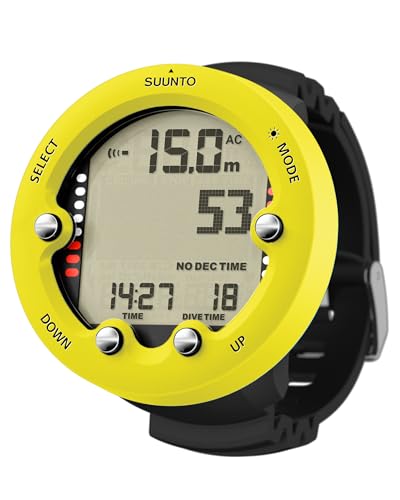
The SUUNTO Zoop Novo offers multiple operating modes, including air and nitrox, with gauge and freedom options. It supports programmable gas mixes from 21% to 50% oxygen and provides both imperial and metric units. Its decompression stop data and audible alarms provide essential safety cues for new divers learning to manage ascent profiles and monitoring dive progress. The Zoop Novo is known for approachable controls and a clear display, which helps beginners acclimate to dive computer data.
SUUNTO Zoop Novo Wrist Computer (Wildberry)
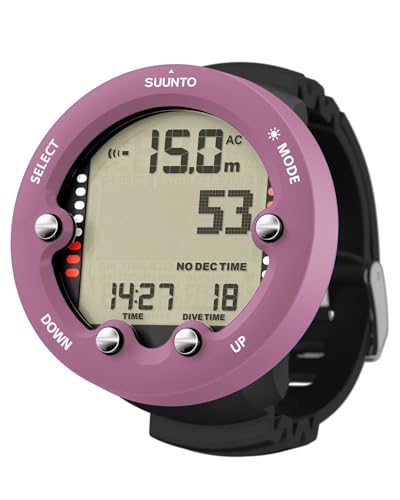
The Wildberry version of the SUUNTO Zoop Novo maintains the same functional capabilities as the Lemon Yellow variant, including air, nitrox, gauge, and freedom modes, programmable gas mixes, and decompression stop data. It offers audible alarms and a versatile interface suited to beginners who appreciate a visually engaging option without sacrificing core depth and safety features. This model remains a solid entry point for divers seeking an intuitive, multifunctional computer.
Shearwater Peregrine Dive Computer

The Shearwater Peregrine is a compact, beginner-friendly option with a simple two-button interface and a state-aware menu structure that makes navigation intuitive. It features a large, readable display and robust battery life of up to about 30 hours on a medium brightness level. The device is known for dependable performance and straightforward operation, making it a strong choice for new divers who want a reliable, easy-to-learn computer from a respected brand.
Buying Guide: Key Purchase Considerations
Display and readability
Beginners benefit from large, high-contrast displays and intuitive menus. Look for devices with readable screens under varying lighting, including underwater conditions. AMOLED or monochrome displays with clear typography reduce confusion during early dives.
Ease of use
Two- or few-button interfaces simplify navigation, reducing the learning curve. Menu structures should be logical, with straightforward access to depth, time, bottom time, and no-deco limits. Consider devices with guided setups or starter modes that walk new divers through initial dives.
Decompression models and safety features
Most beginner-friendly computers use standard decompression models (such as Bühlmann variants). Check that the device supports nitrox mixtures (21–50%) and provides audible alarms and clear ascent guidelines. Reliable safety stops and clear warnings help prevent decompression risks during early dives.
Battery life and charging
Long battery life reduces the need for frequent charging on trips. If possible, choose a model with a replaceable battery or easy recharge options. Battery duration varies by display brightness and usage, so plan for safer margins on longer outings.
Durability and water resistance
Dive computers should withstand saltwater exposure, humidity, and occasional impacts. Look for water resistance ratings suitable for recreational diving (typically 100 meters or more) and rugged construction that fits your typical diving environment.
Display of data and connectivity
Beginner divers benefit from straightforward data presentation. Some models offer smartwatch features or GPS logging, which can be helpful for surface tracking and future trips. Consider whether you want smart features in addition to dive data.
Brand ecosystem and future-proofing
Popular brands with robust support and accessory ecosystems may offer better long-term value. If you anticipate upgrading equipment, choose a model that aligns with your preferred brand’s future features, software updates, and optional transmitters or add-ons.